

-copy.png?width=1800)
We’re back with another feature-packed update bringing smarter insights, smoother workflows, and more control where it matters most.
A redesigned Presentation interface (formerly ‘Polls’), AI-powered word clouds, PowerPoint integration improvements, more control over responses and answers, and behind-the-scenes improvements to make managing Vevox even easier in your organization.
Scheduled Release date: Sunday 7th June
Why it matters: Faster presenting, better audience understanding, and more flexibility for educators and enterprise teams alike (all based on your feedback).
Let’s dive in 👇
‘Polls’ area becomes ‘Presentation’ workspace (Big UI Upgrade)
What used to be the Polls section has now evolved - because what you create in Vevox has evolved too.
This area has been renamed to Presentation, reflecting its expanded scope. The Presentation area now brings everything together in one place, including:
-
All ‘Live’ Polling types
-
Supporting content – Text, Images and Videos
-
Scoreboards - for individuals and/or teams
-
Spin the Wheel
-
Demographic analysis
-
Timer displays
-
…and more presentation and visual formats as Vevox continues to grow
Why this matters
-
Easier to prepare, practice and present
-
Navigation is familiar for existing users, but simpler - fewer clicks, clearer structure, more intuitive
-
The things you reach for most are exactly where you’d expect them
Watch the explainer videoSee details on the help site (includes a side comparison)
AI-Powered instant Word Cloud Analysis
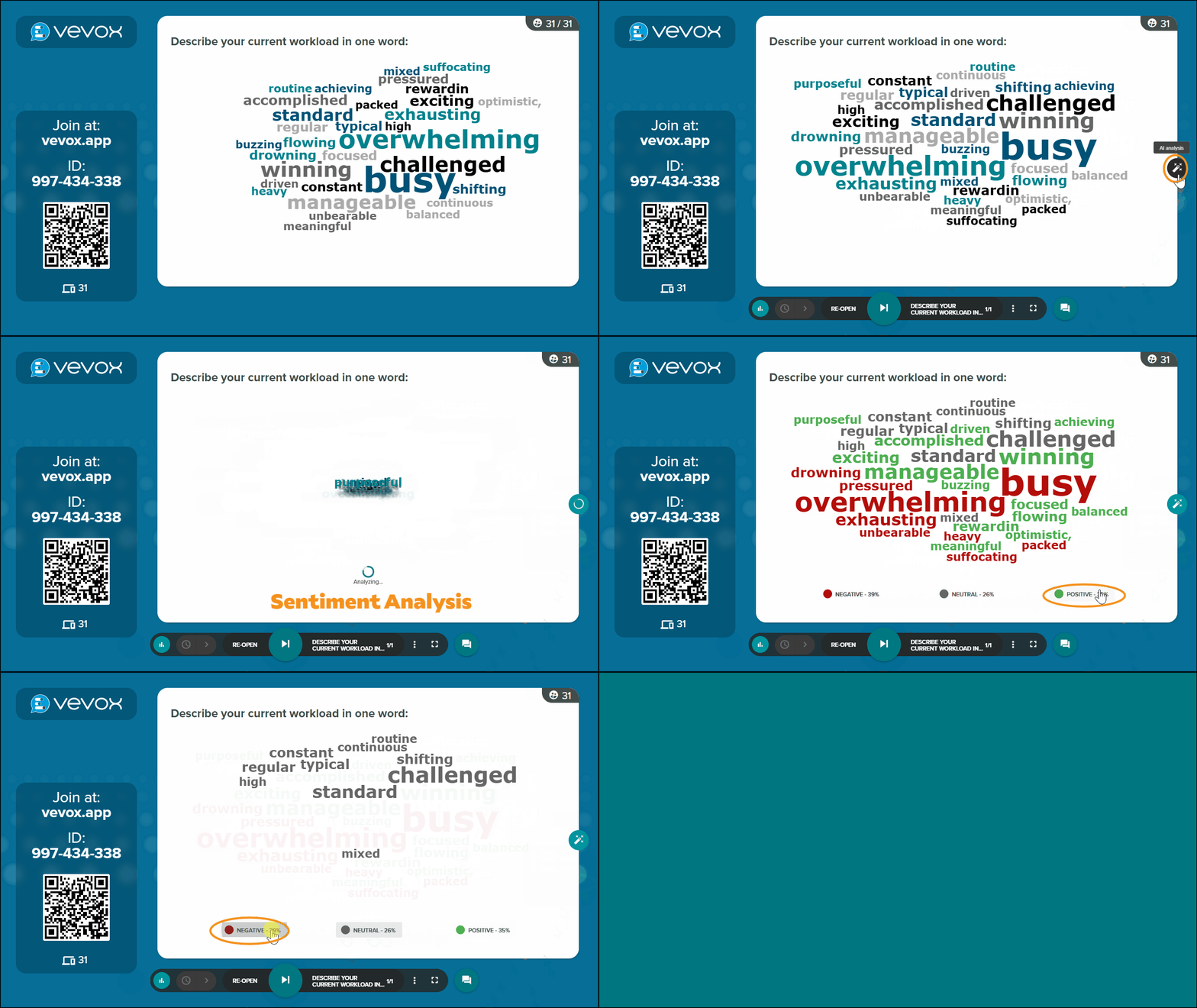
We’re introducing AI-driven analysis in word clouds - right in Present View.
New capabilities:
-
Smart grouping of similar responses
-
Real-time sentiment analysis
Why this is a big deal:
-
Instantly understand audience sentiment
-
Group similar responses into themes
-
1 click to show (zero planning or preparation required)
Plus- More Control Over Word Cloud Responses
You can now limit how many responses participants can submit to a word cloud.
What this means:
-
Set a cap on responses per user
-
Prevent spamming or over-submission
-
Keep results balanced and fair
Note- this is an optional setting so total flexibility to manage Word Clouds the way you wish.
Calling all PowerPoint Integration Users...
We've made some processing speed and workflow improvements for even smoother set up and management of polls. As this slightly changes how some features will behave, we recommend you watch the video below before your next session.
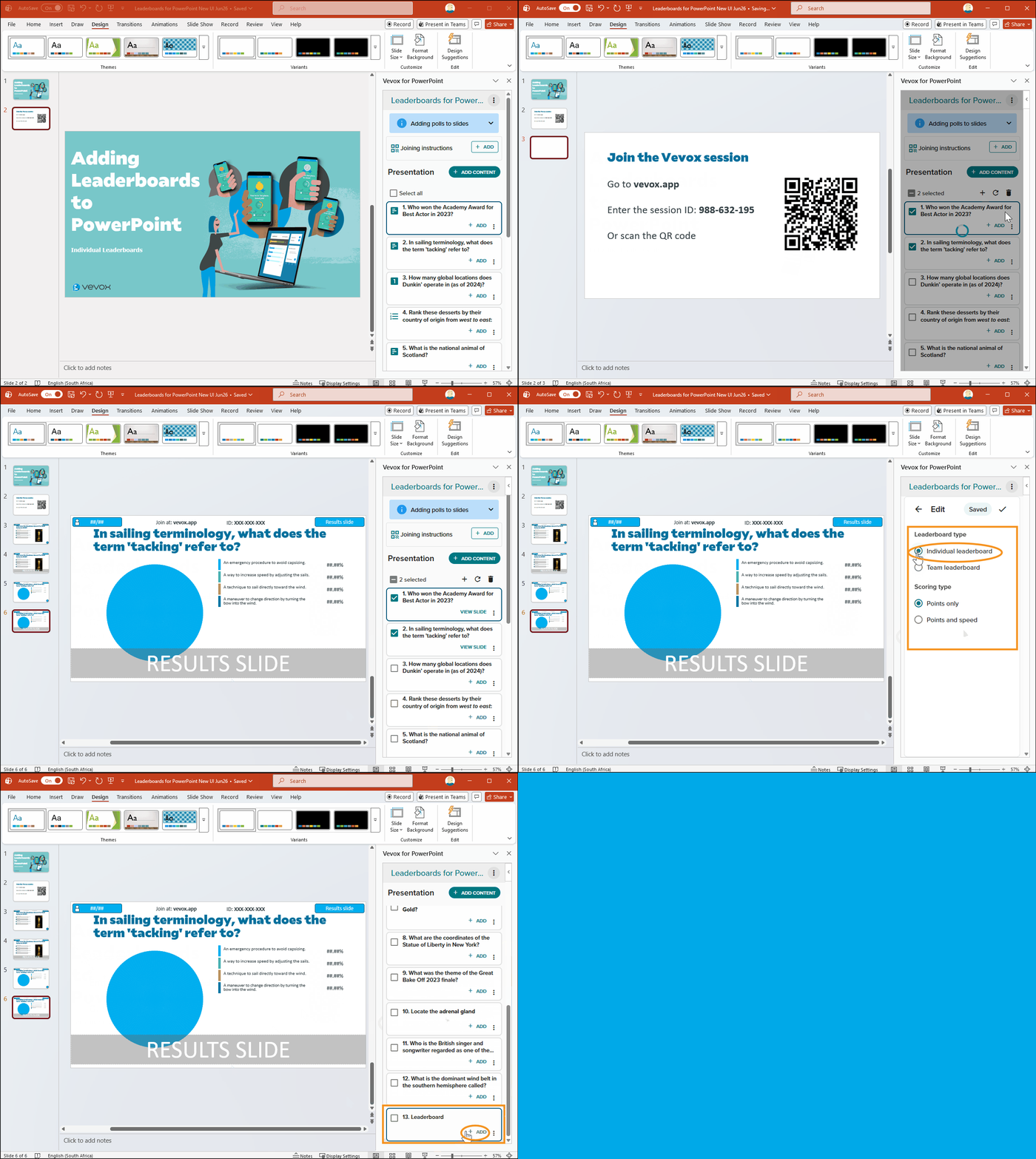
Watch the full video: See what's new in the PowerPoint Add-in
Edit Correct Answers After Running a Poll
Set up in a hurry, or made a mistake? No problem.
You can now change the correct answer after a quiz question has been run.
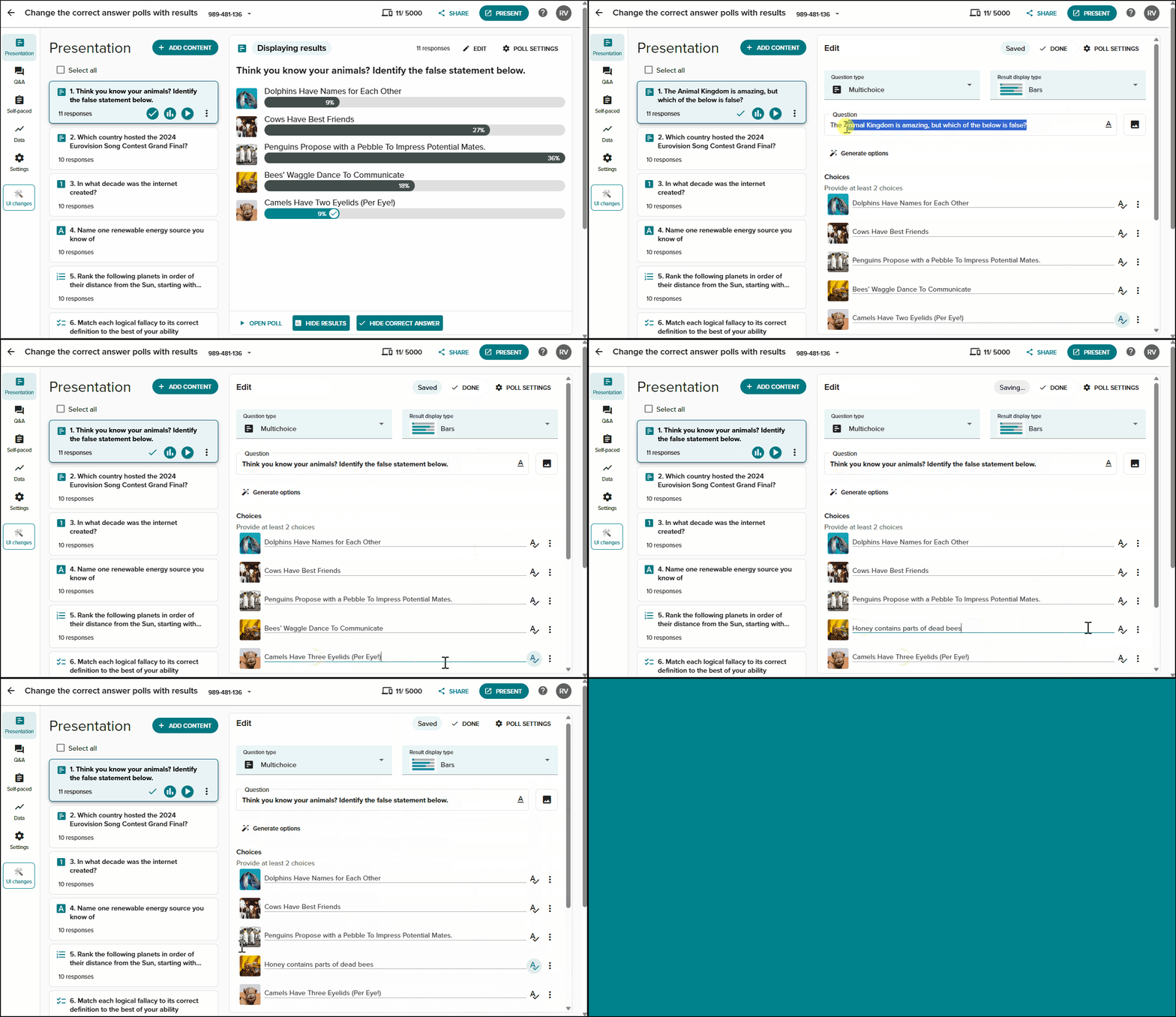
Perfect for:
-
Educators synching Vevox with LTI integrations
-
Fixing errors without rerunning sessions
-
Adjusting marking after delivery
More control on Present View notifications/announcements
We’ve removed the default “Welcome” message in Present View.
Now you can:
-
Show nothing when Q&A is off
Or -
Set a custom welcome message/announcement
Rich Text Editor Improvements
We’ve added colour options to the rich text editor across these key areas:
-
Question titles and choice options
-
Content slides
-
Correct answer explanations

Department-Level Controls and management
We’re piloting department-level management for enterprise and institutions.
This will enable:
-
Different themes and settings per department
-
Segmented user access
-
More enterprise-level control of users
Note: This is being rolled out gradually with selected customers. Please let your Customer Success Manager know if you would like to find out more.
What didn’t quite make it in!
We’re still working on:
-
Multiple responses for text polls (coming soon!)
Important: Scheduled Downtime
To support technical improvements, this release includes a very short downtime (1 hour max) on Sunday 7th June 06:00 UTC (7am BST / 9am EEST / 2am EDT)
In case you missed it...
There has been a huge amount of additions and improvements to Vevox in recent months.
To catch up with what else has been new watch our recent “What’s New, What’s Next” webinar.
Why it’s worth the watch:
-
Pulls together multiple recent releases
-
Shows features working live in real sessions
-
Highlights practical use cases and tips
Or read the recent release articles:
Introducing Vevox's new Google Slides integration


