


New ways to engage, New tools to save time, New power to level up every session...
We’re kicking off 2026 with a seriously feature packed release, landing 16th March 2026 and designed to make live sessions smoother, faster, more interactive and, frankly, more fun.
And with Vevox recently recognised as a Top 50 Education Tool by G2 (huge moment! 😊), we’re doubling down on the features you’ve told us matter most.
Let’s get into what’s new:
-
Quick Polls (Ad hoc polling)
-
Custom Countdown Timer Sounds
-
Presentation Content- Session/Break Timer
-
AI Quiz and Poll Generator Upgrades
-
PowerPoint Online Embedded IN Present View
-
Plus… UI polish, accessibility enhancements & performance upgrades.
Scroll on for the lowdown on each 👇
🧩 1. Matching Question Type
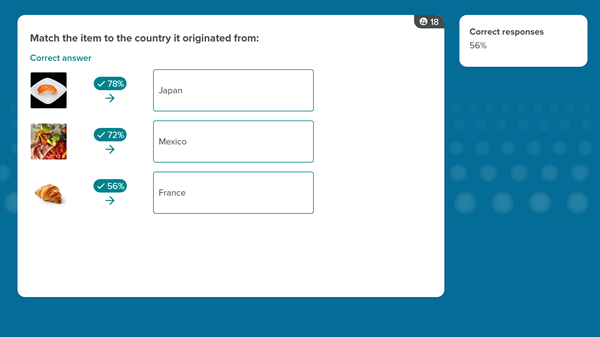
Great for quizzes. Perfect for learning. Built for engagement. Matching questions (aka matching pairs / mix & match) are now available for live polls and surveys.
Match capital cities, definitions, concepts, images - anything that benefits from pairing two lists.
Why you’ll love it:
-
Ideal for education (a huge request from lecturers & trainers).
-
Makes knowledge checks feel interactive, not test-like.
-
Supports images on one side of the pair for visual learning.
-
Randomized answer order keeps things fair & fun.
Use case ideas:
✔ Geography & language pairing
✔ Corporate onboarding
✔ Safety/compliance checks
✔ Product training
✔ Memory recall & revision sessions
Included on all Pro, Institutional and Enterprise plans.
⚡ 2. Quick Polls
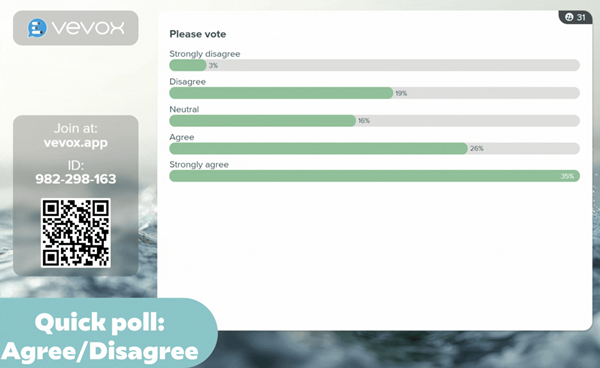
Your new “grab-and-go” polling tool. Want fast feedback without setting anything up? Quick Polls let you launch templated questions instantly from Present View.
Why it’s a game changer:
-
No pre-configuration needed.
-
Perfect for live workshops, standups, and spontaneous check-ins.
-
Great for facilitators who need agility in the room.
-
Enables real-time sentiment checks (“How’s the pace?”, “Ready to move on?”, etc.).
If you’ve ever thought “I wish I could launch a poll right now” - this is for you.
Included on all Pro, Institutional and Enterprise plans
🔊 3. Custom Countdown Timer Sounds
Set the tone(s) for your sessions! Upload your own MP3 audio to accompany countdown timers. How people are already planning to use it:
-
Branded countdown tones for events.
-
Gentle timers for wellbeing sessions.
-
Fun sounds for quizzes or student engagement.
-
High energy sounds to build anticipation.
Included on all Pro, Institutional and Enterprise plans
⏱️ 4. Presentation Content Timer
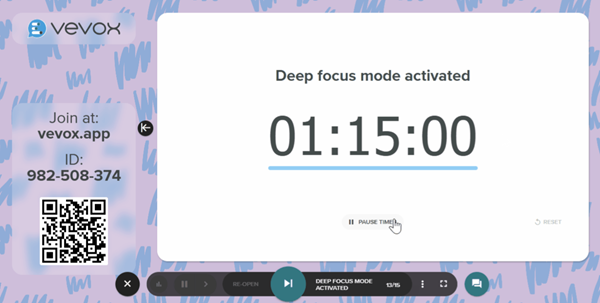
A clean, modern timer slide for sessions that run like clockwork. This new display lets you show a title + a live timer directly in Present View. A simple (no need to switch screens) addition that keeps everyone aligned.
Perfect for:
-
Breakout exercises.
-
Session resumptions (“Back in 10 minutes”).
-
Timed challenges.
-
Pacing longer presentations.
Included on all Pro, Institutional and Enterprise plans
🤖 5. AI Quiz Generator - Now Smarter, Faster & More Flexible
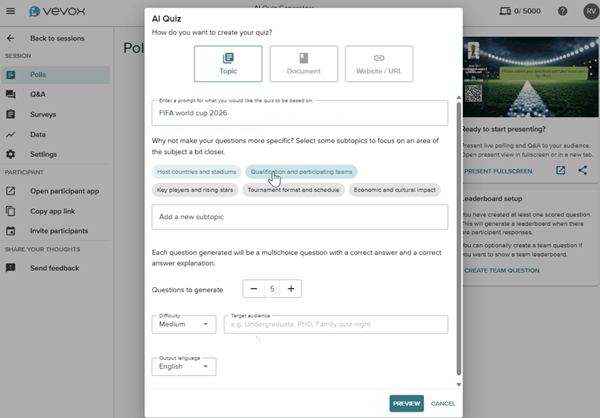
We’ve upgraded the AI Quiz tool to give you more control, accuracy and customization. Generate better quizzes in less time with output that matches the level and context you actually need.
What’s new
-
Add subtopics → More focused, relevant quizzes.
-
Upload multiple documents → Build quizzes from richer source material.
-
Use a website URL as your source → Hugely expands what you can generate from.
-
Target audience selector → Tailor difficulty for students, employees, specialists, or mixed groups.
Included on all plans
📊 6. PowerPoint (Online) Embedded in Present View
Run your whole session from Vevox - no switching tabs. You can now embed a PowerPoint Online presentation directly into Present View. This is a huge step toward enabling fully end-to-end session delivery inside Vevox.
Benefits:
-
Seamlessly move between slides, polls, Q&A and Quiz scores.
-
Keep everything controlled from one screen - Reduce the “AltTab shuffle”.
-
Great for presenters who want simplicity without losing functionality
-
No need to make copies of, or reformat PowerPoint presentations. Link to the latest/Live version
Included on all Pro, Institutional and Enterprise plans
🛠 Plus… Polishing, Tweaking, Improving
As always, the release includes numerous refinements across accessibility, performance, UI clarity and ease of use. Small things that add up to a smoother experience every day.
Two key performance improvements you’ll find within the PowerPoint Polling Integration:
-
Faster processing and results display once the poll has closed.
-
Improved formatting for Polling questions with long titles and/or questions options.
🚀 Release Day and further resources:
Everything goes live on Monday 16th March.
All features you are eligible for in your plan will automatically appear in your Vevox dashboard, just log in to try them. The helpsite will be updated with comprehensive step by step guides and videos.
To experience all the new Vevox features in action ‘live’… and get a sneak peak or what’s next register for our April ‘What’s New, What’s next’ webinar.
🎉 And finally.. a Big Thank You to G2 Top 50 Education Tools. We were recently ranked among G2’s Top 50 Education Products for 2026, a milestone we’re incredibly proud of.

Your feedback is what drives this platform forward, and this release reflects exactly that.
As always we LOVE to hear your feedback and ideas, please don’t hesitate to drop your Customer Success or account manager a line, or email us a at feedback@vevox.com.


